Getters and Setters in Java
Introduction
In Object-Oriented Programming (OOP), objects represent real-world entities. These objects contain data (instance variables) and methods (actions). In a professional application, direct access to an object's internal variables from external classes is discouraged. Instead, we use getters and setters to control how data is read and updated.
Why Do We Need Getters and Setters?
Imagine an application where an external class can modify an object's properties directly:
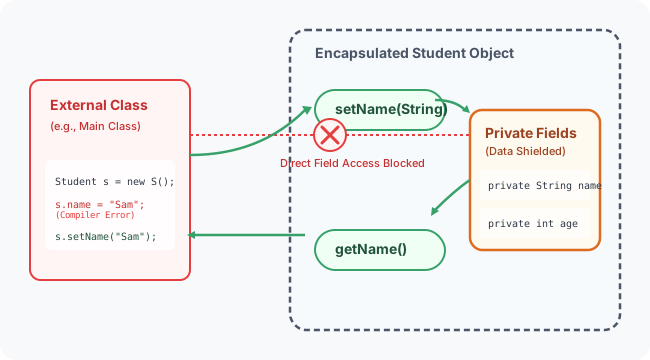
Allowing direct modifications can lead to corrupted object states (e.g., negative ages, negative account balances). To prevent this, we declare fields as private and expose access via public getter and setter methods. This approach is called Encapsulation.
What is a Setter?
A Setter is a public method inside a class used to update or write the value of a private variable. Setters usually do not return any value (void) and accept a parameter representing the new value.
Setter Benefits:
- Validation: You can write rules to reject invalid inputs.
- Control: You can make fields read-only by simply omitting the setter method.
Setter Syntax
What is a Getter?
A Getter is a public method inside a class used to read or retrieve the value of a private variable. Getters must return the same data type as the variable and do not accept parameters.
Getter Syntax
Real-World Example: Student Age Validation
Let's look at a class that enforces a validation rule: a student's age must be greater than zero.
public class Student {
    private String name;
    private int age;

    // Setter for name
    public void setName(String name) {
        this.name = name;
    }

    // Getter for name
    public String getName() {
        return this.name;
    }

    // Setter for age with validation
    public void setAge(int age) {
        if (age > 0) {
            this.age = age;
        } else {
            System.out.println("Error: Age must be positive. Defaulting to 1.");
            this.age = 1;
        }
    }

    // Getter for age
    public int getAge() {
        return this.age;
    }
}
Main Program Usage
public class Main {
    public static void main(String[] args) {
        Student student = new Student();

        // Attempting to set valid data
        student.setName("Sanjay");
        student.setAge(21);
        System.out.println(student.getName() + " is " + student.getAge() + " years old.");
        // Output: Sanjay is 21 years old.

        // Attempting to set invalid data
        student.setAge(-5);
        System.out.println("Corrected Age: " + student.getAge());
        // Output: Error: Age must be positive. Defaulting to 1.
        // Output: Corrected Age: 1
    }
}
Advanced Example: Bank Account Transactions
Here is a more advanced example demonstrating a bank account class where deposits and withdrawals are validated.
public class BankAccount {
    private String accountNumber;
    private double balance;

    public void setAccountNumber(String accountNumber) {
        this.accountNumber = accountNumber;
    }

    public String getAccountNumber() {
        return this.accountNumber;
    }

    // deposit acts as a controlled setter
    public void deposit(double amount) {
        if (amount > 0) {
            this.balance += amount;
        } else {
            System.out.println("Invalid deposit amount.");
        }
    }

    // withdraw acts as a controlled setter
    public void withdraw(double amount) {
        if (amount > 0 && amount <= this.balance) {
            this.balance -= amount;
        } else {
            System.out.println("Insufficient funds or invalid withdrawal amount.");
        }
    }

    public double getBalance() {
        return this.balance;
    }
}
Getter vs. Setter Comparison
| Getter | Setter |
|---|---|
| Operation | Read operation |
| Return Type | Returns the field's data type |
| Parameters | Does not take parameters |
| Prefix | Starts with get (or is for booleans) |
Common Mistakes
1. Forgetting the this Keyword
// WRONG
public void setName(String name) {
    name = name; // Assigns the parameter to itself; instance field remains unchanged
}

// CORRECT
public void setName(String name) {
    this.name = name;
}
2. Bypassing Setters Inside the Class
Even within the class methods, it is best practice to use getters/setters when updating fields to ensure validation rules are always triggered.
3. Exposing Mutable Objects Directly
Returning a direct reference to a mutable private object (like an array or arraylist) allows external users to bypass getters/setters. Consider returning a copy instead.
Concept Map
graph TD
    Class[Class] --> Fields[Private Fields]
    Class --> Methods[Public Access Methods]
    Methods --> Getters[Getters: Retrieve data]
    Methods --> Setters[Setters: Validate and update data]
Interview Questions (FAQ)
What is a getter?
A public method used to retrieve the value of a private instance variable.
What is a setter?
A public method used to update the value of a private instance variable.
Why do we make class variables private?
To prevent external classes from accessing or modifying variables directly. This protects the internal state of the object, ensuring high data integrity.
What is encapsulation?
Encapsulation is one of the four main OOP concepts. It is the mechanism of wrapping code and data together in a single unit (class) while keeping variables hidden (private) and exposing them only via public interfaces (getters/setters).
Practice Challenges
- Car Class: Create a
Carclass with private propertiesmodel,color, andfuelLevel. Enforce a rule thatfuelLevelmust be between0.0and100.0. - Employee Class: Create an
Employeeclass with private variablesnameandsalary. Enforce that the salary setter rejects negative values. - Smart TV Class: Design a
SmartTVclass with a private fieldchannel. Enforce a rule that channels can only range from1to999.
Key Takeaways
- Getters retrieve private data.
- Setters update private data after validation checks.
- Private variables restrict direct access, improving code safety.
- Using getters and setters is a core design standard in Java programming.
Back to Module Home: Building Blocks of Java