Classes and Objects in Java
Introduction
In the real world, everything around us can be represented as an object. Examples include a Car, a Mobile Phone, a Student, an Employee, or a Bank Account. In software development, Object-Oriented Programming (OOP) allows us to model these real-world objects in code.
Each real-world object possesses two characteristics: 1. Properties (State/Data): What the object knows or holds (e.g., a phone's model, color, RAM). 2. Behaviors (Actions): What the object can do (e.g., a phone can call, send a message, or take photos).
Mobile Phone
├── Properties: Model, Color, RAM, Processor
└── Behaviors: Call(), Message(), PlayMusic(), TakePhoto()
Java uses Classes to define these object templates. Classes are the foundation of Object-Oriented Programming.
What is a Class?
A Class is a blueprint, template, or prototype used to create objects. Think of a class as a design plan or a schema. It describes the data structures and methods that the objects created from it will possess, but it does not represent any physical object itself. It occupies no heap memory space until instantiated.
Real-World Analogy: The House Blueprint
Before building a house, an architect creates a blueprint. The blueprint defines the layout (rooms, doors, windows, dimensions), but it is not an actual house you can live in. You can use that single blueprint to build one, ten, or a hundred physical houses.
Similarly, a class is the blueprint, and objects are the actual physical houses built from it.
What is an Object?
An Object is a physical instance of a class. When you create an object, you are creating a concrete entity that occupies space in heap memory and holds its own unique state data.
Class: Cellphone
├── Object 1 (Instance): OnePlus (RAM: 12GB, Color: Black)
├── Object 2 (Instance): Apple (RAM: 8GB, Color: Silver)
└── Object 3 (Instance): Samsung (RAM: 16GB, Color: Grey)
Class and Object Relationship
The process of creating an object from a class blueprint is called Instantiation. In Java, this is done using the new keyword:
Here, Cellphone is the class (blueprint), and phone1 and phone2 are reference variables pointing to separate object instances in heap memory.
Why Classes Are Needed
Without classes, organizing and maintaining data for complex structures is extremely difficult. For example, if you wanted to track data for three different mobile phones, you would have to declare loose, unrelated variables for each:
String phone1Model = "Nord";
int phone1Ram = 12;

String phone2Model = "iPhone 15";
int phone2Ram = 8;
Managing this for hundreds of objects is impossible. By using a class, you group related data and behaviors into a single, cohesive type:
Now you can easily declare and group variables:
Basic Class Syntax
A class definition consists of access modifiers, the class keyword, the class name, variables (fields), and methods (behaviors).
public class Student {
    // Instance Variables (Properties)
    String name;
    int age;

    // Methods (Behaviors)
    void study() {
        System.out.println(name + " is studying.");
    }
}
Memory Representation of Objects
When you instantiate a class in Java using new, memory is allocated in two distinct JVM areas: 1. Stack Memory: Stores the reference variable (the pointer). 2. Heap Memory: Stores the actual object data (the state values of its fields).
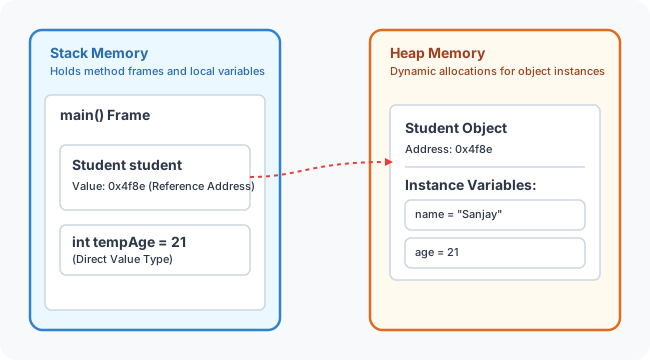
What does the new keyword do?
The new keyword dynamically allocates memory on the Heap for the object, initializes its fields to their default values (e.g. 0 for numbers, null for objects), and returns a reference (memory address) to the newly created object.
Encapsulation: Shielding Object Data
In professional Java design, object fields are rarely exposed directly. Exposing fields directly (e.g., onePlus.model = "Nord") makes the object vulnerable to corrupt data or bypasses verification.
Encapsulation is the practice of bundling data and methods inside a class, and hiding implementation details from the outside world. This is achieved by: * Marking variables as private (restricting access to the class itself). * Exposing controlled access via public getter and setter methods.
public class Cellphone {
    // Private properties (encapsulated)
    private String model;
    private int ram;

    // Public Setter (modifies data with validation)
    public void setModel(String model) {
        String validModel = model.toLowerCase();
        if (validModel.equals("nord") || validModel.equals("7pro")) {
            this.model = model;
        } else {
            this.model = "unknown";
        }
    }

    // Public Getter (reads data)
    public String getModel() {
        return this.model;
    }
}
Understanding the this Keyword
In the statement this.model = model;: * this.model refers to the instance variable belonging to the current object. * model refers to the local parameter passed into the method. The this keyword resolves naming conflicts and references the current instance executing the code.
Complete Executable Example
Here is a complete program demonstrating class instantiation, encapsulation, and validation:
public class Cellphone {
    private String model;
    private int ram;

    public void setModel(String model) {
        String validModel = model.toLowerCase();
        if (validModel.equals("nord") || validModel.equals("7pro")) {
            this.model = model;
        } else {
            this.model = "unknown";
        }
    }

    public String getModel() {
        return this.model;
    }
}

public class Main {
    public static void main(String[] args) {
        Cellphone onePlus = new Cellphone();
        Cellphone apple = new Cellphone();

        // Attempting to set an invalid model
        onePlus.setModel("8max");
        System.out.println("onePlus model: " + onePlus.getModel()); // Output: unknown

        // Setting a valid model
        apple.setModel("7pro");
        System.out.println("apple model: " + apple.getModel());     // Output: 7pro
    }
}
Class vs. Object Comparison
| Feature | Class | Object |
|---|---|---|
| What it is | Blueprint / Template | Real physical instance |
| Entity type | Logical entity | Physical entity |
| Creation | Declared once in code | Created multiple times using new |
| Memory | No memory allocated for data | Allocated memory on the heap |
Common Mistakes
1. Accessing Private Variables Directly
// WRONG (Will result in compilation error)
phone.model = "Nord";

// CORRECT
phone.setModel("Nord");
2. Calling Methods on Uninitialized References (NullPointerException)
// WRONG
Cellphone phone;
phone.setModel("Nord"); // Runtime Error: Variable not initialized

// CORRECT
Cellphone phone = new Cellphone();
phone.setModel("Nord");
Concept Map
graph TD
    OOP[Object-Oriented Programming] --> Class[Class Blueprint]
    Class --> Object[Object Instance]
    Object --> Properties[Properties / Data]
    Object --> Behaviors[Behaviors / Methods]
    Properties --> Encapsulation[Encapsulated via private fields]
    Behaviors --> Access[Accessed via public Getters/Setters]
Interview Questions (FAQ)
What is a class?
A class is a logical blueprint, template, or design plan used to instantiate objects. It defines the state (fields) and behavior (methods) that all objects of its type will have.
What is an object?
An object is a physical instance of a class. It represents a real-world entity, resides on the Heap memory, and maintains its own separate copy of variables.
What does the new keyword do?
The new keyword instantiates a class. It allocates memory on the Heap for the object, runs the constructor, and returns the reference address.
What is encapsulation?
Encapsulation is the process of wrapping data (variables) and code (methods) together into a single unit (class) while hiding inner details. Direct access to data is blocked using the private modifier, and controlled access is provided via public getter and setter methods.
Practice Challenges
- Car Class: Create a
Carclass with private fieldsbrand,engineSize, andisElectric. Add public getters/setters. Enforce thatengineSizemust be positive. - BankAccount Class: Create a class representing a bank account with a private
balancefield. Implement a setterdeposit(double amount)that rejects negative deposits, and a getter. - Encapsulated Employee: Create an
Employeeclass containingid,name, andsalary. Validate thatsalarycannot be less than zero.
Key Takeaways
- Classes act as blueprints; Objects are instances.
- Objects are instantiated on the Heap using
new, while reference pointers reside on the Stack. - Use
privatefields andpublicgetters/setters to implement Encapsulation. - The
thiskeyword refers to the current object instance and resolves naming conflicts.
Back to Module Home: Building Blocks of Java