The Switch Statement in Java
This guide details the specifications of the switch multi-way branch structure, matching rules, break and fall-through mechanics, supported data types, and performance differences against if-else ladders.
Introduction
When an application must evaluate a single variable against multiple potential discrete values (such as processing numeric menu options, checking character grades, or routing user commands), chain-linking multiple else-if blocks makes source code long and difficult to read.
In Java, multi-way branch routing is handled by the switch statement.
Syntax and Structure
switch (expression) {
    case value1:
        // Executed only if expression equals value1
        break;
    case value2:
        // Executed only if expression equals value2
        break;
    default:
        // Executed if no case matches the expression
        break;
}
expression: The variable or value being checked.case: Declares a discrete literal check. Case labels must be constant expressions of the same type as the switch expression.break: Branching statement. Exits the switch structure immediately.default: Optional block. Runs if no matching case is found.
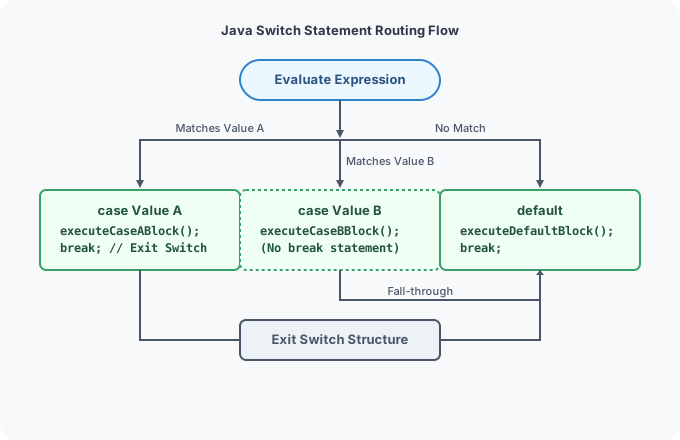
Workflow Mechanics
The JVM directly routes execution to the matching case label. If no break keyword is specified, execution continues downwards through subsequent cases.
Supported Data Types
Unlike if-else statements which accept any boolean checks, the switch statement supports only specific data types:
- Primitives:
byte,short,char,int(and their respective wrapper classesByte,Short,Character,Integer). - Objects:
java.lang.String. - Structures:
enumtypes.
[!WARNING] Floating-point types (
float,double) andbooleanare not supported by switch expressions.
Implementation Examples
1. Basic Switch Case
public class DayOfWeek {
    public static void main(String[] args) {
        int day = 3;

        switch (day) {
            case 1:
                System.out.println("Monday");
                break;
            case 2:
                System.out.println("Tuesday");
                break;
            case 3:
                System.out.println("Wednesday");
                break;
            default:
                System.out.println("Invalid day index.");
                break;
        }
    }
}
2. Evaluator Using Strings
public class SecurityConsole {
    public static void main(String[] args) {
        String role = "Admin";

        switch (role) {
            case "Admin":
                System.out.println("Full system access granted.");
                break;
            case "User":
                System.out.println("Standard read access granted.");
                break;
            default:
                System.out.println("Guest restricted access.");
                break;
        }
    }
}
The Break Keyword and Fall-Through Behavior
If a break statement is omitted, the program executes the statements of the matching case and continues down into the blocks of subsequent cases unconditionally. This is known as Fall-Through.
Fall-Through Code Example
public class FallThroughDemo {
    public static void main(String[] args) {
        int priority = 1;

        switch (priority) {
            case 1:
                System.out.println("Enable High Alert Checks.");
            case 2:
                System.out.println("Verify System Sensors.");
            case 3:
                System.out.println("Notify Administrators.");
                break;
            default:
                System.out.println("Normal Operations.");
                break;
        }
    }
}
Output
Comparisons: Switch vs. If-Else
| Parameter | switch Statement | if-else Ladders |
|---|---|---|
| Matching Style | Discrete values matching (equality check). | Relational check (ranges, complex logic). |
| Data Types | Integer primitives, String, Enum. | Any expression resolving to boolean. |
| Performance | Faster on large case sets (uses jump tables). | Slower (evaluates each condition sequentially). |
Practice Challenges
Challenge 1: Calculator operations
Write a program that takes two double operands and a character operator (+, -, *, /). Use a switch statement to perform the calculation and print the result.
Challenge 2: Season display
Write a program that takes an integer month (1 to 12) and prints the corresponding season (Winter, Spring, Summer, Autumn) using a switch statement. Combine cases utilizing fall-through features where appropriate.
Challenge 3: Menu Console
Create a console interface check where a user picks options: 1 (Update profile), 2 (Settings), 3 (Logout). Output text actions for each case.
Back to Module Home: Control Flow Statements