Function Design and Modular Programming in Java
This module covers Java keywords, parsing utilities, console reading abstractions, method design, modular problem-solving, and method overloading (compile-time polymorphism).
Learning Objectives
By the end of this module, you will be able to: * Differentiate between reserved Java keywords and expressions. * Parse strings into numeric primitives using wrapper classes (Integer.parseInt, Double.parseDouble, etc.). * Handle user inputs using console stream abstractions. * Design and define modular methods with parameters and return types. * Structure software solutions using method-based abstraction principles. * Apply method overloading rules to implement compile-time polymorphism. * Trace and explain JVM stack frame execution during method invocations.
Topics Index
Below is the directory map of the lessons contained in this module:
| Lesson File | Core Concepts Covered | Link |
|---|---|---|
| 01. Keywords & Expressions | Predefined Java syntax, statement structures, expression evaluations. | Open Guide |
| 02. String to Primitive Conversion | Wrapper parsing utilities, handling NumberFormatException exceptions. | Open Guide |
| 03. User Input | Capturing command-line and interactive console stream arguments. | Open Guide |
| 04. Methods in Java | Defining methods, calling syntax, stack allocation lifecycles. | Open Guide |
| 05. Method-Based Problem Solving | Code decomposition, separation of concerns, writing clean methods. | Open Guide |
| 06. Method Challenges | Logic building exercises using modular class methods. | Open Guide |
| 07. Challenge Solutions | Complete solution references for the method exercises. | Open Guide |
| 08. Method Overloading | Implementing compile-time polymorphism, signature rules. | Open Guide |
| 09. Overloading Challenges | Advanced validation exercises utilizing overloaded signatures. | Open Guide |
Core Theory Summary
1. Structure of a Java Method
A method is a block of code containing statements that executes only when called. It promotes code reusability and encapsulation.
accessModifier returnType methodName(parameterList) {
    // Method body containing logic
    return value; // (Required if returnType is not void)
}
- Access Modifier: Dictates if other classes can call the method (e.g.,
public,private). - Return Type: The data type of the value returned by the method. If no value is returned, use
void. - Method Name: The identifier used to call the method (uses camelCase).
- Parameter List: Input variables passed to the method, defined by their type and name.
- Method Signature: The combination of the method name and the parameter list. The return type is not part of the signature.
2. Method Overloading (Compile-Time Polymorphism)
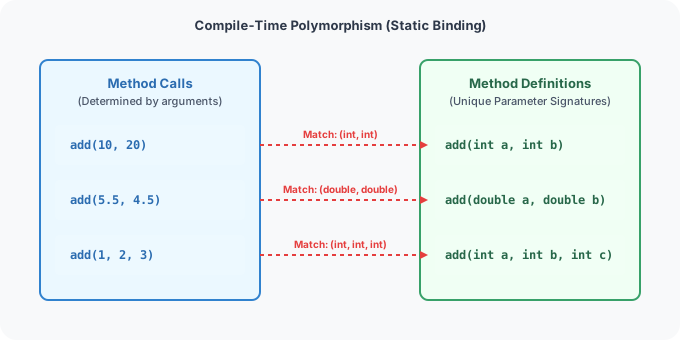
Method overloading allows a class to have multiple methods with the same name, provided their parameter lists are unique.
flowchart TD
    Start[Compiler Encounters Method Call: add] --> Q1{Are parameter counts different?}
    Q1 -- Yes --> Match1[Bind to matching parameter count]
    Q1 -- No --> Q2{Are parameter types different?}
    Q2 -- Yes --> Match2[Bind to matching parameter types]
    Q2 -- No --> Q3{Is parameter order different?}
    Q3 -- Yes --> Match3[Bind to matching parameter order]
    Q3 -- No --> Error[Throw Compile-Time Error: Duplicate Method]
Overloading Rules
To successfully overload a method, definitions must vary by at least one of the following criteria: * The number of parameters. * The data types of parameters. * The sequence/order of parameter types.
[!WARNING] Changing only the return type or access modifier of a method does not overload the method. The compiler will flag this as a duplicate method declaration error.
Best Practices for Method Design
- Keep Methods Small: A method should perform one specific task (Single Responsibility Principle). If a method does multiple things, break it down.
- Use Verb-based Names: Method names should represent actions (e.g.,
calculateInterest,saveRecordrather thaninterestorrecord). - Validate Parameters: Check inputs at the beginning of a method (e.g., check for null values or out-of-bound ranges) before running business logic.
- Limit Parameter Count: Try to limit the number of parameters to three or four. If a method requires more, consider grouping them into a helper class or object.
Next Module: Let's learn about conditional routing, switch cases, and loops in 04_control-flow-statements